
Understanding that any number can be represented using only the digits “1” and “0” is fundamental to understanding how computers store, process and transmit information. To investigate this concept further, and to practice writing (and de-bugging!) algorithms, let’s code the Crumble to play “Binary snap”. This game will involve matching binary numbers, represented on a Sparkle Baton, with the decimal value on a Smart Crumb: Digits.
If you aren’t familiar with what binary numbers are, take a look at this article explaining them, but put simply binary is a number system which uses only two digits: 1 and 0. This means we can represent a number on the Sparkle Baton by switching the individual LEDs on (“1”) or off (“0”). Let’s begin by working out how we can algorithmically convert a number into binary.
Whilst jotting down the first 16 numbers in binary to look for a pattern, we remembered a faint snippet of information from when learning about this back at school. An easy way to convert between decimal numbers and binary is to work methodically from largest place value column to smallest e.g. 8 | 4 | 2 | 1, comparing your number to the place value column. If your number is greater than or equal to the place value column, then put a one and subtract the place value from your number. If not, then we put a 0 in the number. After each ‘check’ we move onto the next smallest place value. It might be easier to see an example.

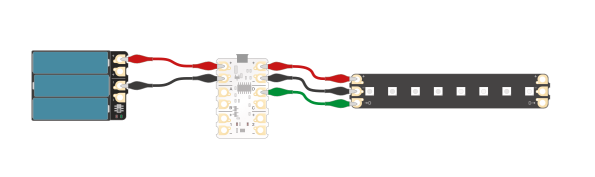
Start by wiring a Sparkle Baton to the Crumble.
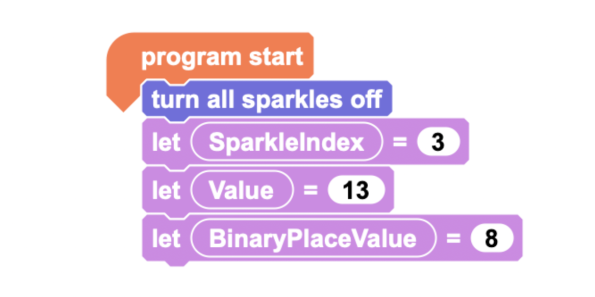
Programming wise, start by clearing our Sparkles and setting up some variables for testing. SparkleIndex refers to which Sparkle we want to light up, Value is our number for converting into binary and BinaryPlaceValue is the place value of the binary columns. We are starting with a 4-bit number so will begin at the highest place value for that which is eight.
In computing terms, a bit is the smallest unit of data and is a portmanteau of binary digit (1 or 0). A 4-bit number refers to a binary number with 4 digits or 24 which is equal to 16. This means a number between 0 and 15.
After this, we can add our algorithm: If Value is greater than or equal to BinaryPlaceValue, light up the current SparkleIndex Sparkle and subtract BinaryPlaceValue from Value, else move on. Decrease SparkleIndex by one and BinaryPlaceValue halves.
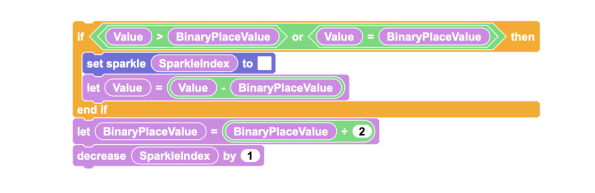
We’re missing some other important parts of this algorithm – it needs to loop back until we’ve passed over every binary place value column. A simple way of doing this is to use our SparkleIndex value as a loop counter, as it decreases on each pass of the loop. As we need to include the zero pass, we’ll set the loop condition to be -1.

The Crumble uses analogue values between 0-255. How many bits is the Crumble?
A. 2
B. 4
C. 6
D. 8
A quick check of a variety of numbers and it seems we have a working program! Notice that the Baton needs to be upside down to display your binary value correctly.

And there we have it, we have successfully made a program that displays a whole number in Binary, using the Crumble controller and a Sparkle Baton. You can display 8-bit numbers if you want, all you need to do is tweak the SparkleIndex and BinaryPlaceValue. The next challenge will be to gamify this in part two!
If you have a go at this project, or any other, we’d love to see! Get in contact with us via email, Facebook, Twitter or our Forum, and we may feature your work!
Comments are closed.