
This year, we were proud to sponsor the Computing at School’s CAS conference 2025 – a wonderful gathering of educators from across the country. As a part of our sponsorship, we got to exhibit as well as run a workshop. Our workshop was on the theme of ‘Getting Creative with the Crumble Controller’, and we delved into the ways in which the Crumble can be used across the curriculum – not just in Computing.
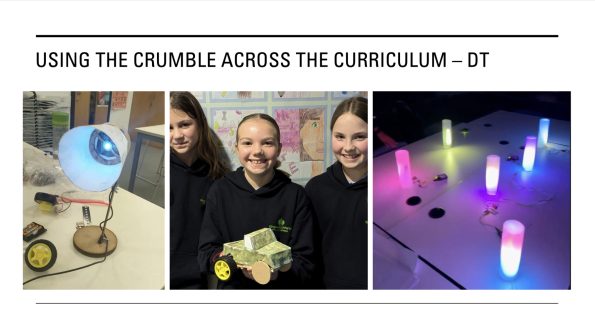
The easiest cross-curricular link to make is with Design & Technology – It’s even written into the primary national curriculum that pupils should “apply their understanding of computing to program, monitor, and control their products.” The Crumble’s built-in motor outputs make it ideal for building cars and fairground rides, as well as controlling mechanisms like cams, levers and pulleys. Sparkles and light sensors make it easy to create lamps and nightlights. We scoured our social media pages for some creative examples of Crumble x DT, as well as creating a few of our own projects. Take a look below for some examples.


Next up we have the subject that puts the S into STEM – science. Another, more obvious link, but one which many people overlook. The Crumble, with its range of inputs and growing selection of Smart Crumbs, can provide a great way to collect data. By combining the Temperature Crumb and the Digits Crumb, you can make a quick and easy digital thermometer. There are also many other possible ways to use the Crumble in science, including, but not limited to:
· Testing the conductivity of different materials.
· Growing plants under different coloured lights.
· Light Sensor and Sparkle – test the transparency of materials.
· Pitch/Tone/Frequency generator using the Pitch Crumb.
· Building Crumble Buggies with wheels covered in different materials, to test friction.
· Sound insulating properties of materials – use a Pitch Crumb or Buzzer covered in different materials to see which blocks the most sound.
· Circuits – some Crumble friendly components can be used to create simple circuits e.g. battery pack – switch – motor.
· DIY switches – using the properties of materials to create your own switches.


Sticking with the STEM theme, we move onto Maths – this is a bonus subject which didn’t feature much in our workshop. Whilst the obvious may be to do with the operator functions you can use when coding, we want to highlight, as with the other projects within this blog, primary level cross curricular links. Some examples of these include:
· Drawing shapes using robots or buggies.
· Probability spinners – what are the odds of a certain result being chosen.
· Nightlights using nets of shapes.

After the more obvious connections, we move onto the more creative ways to connect other subject areas.
PE:
· Create a stopwatch to time races. This could be triggered by a DIY pressure pad, which automatically starts/stops the timer.
· Score counters using the Digits Crumb and a switch.
· Team pickers – projects that choose between multiple options to divide children.
· Reaction timers – using a switch/Sparkles/Digits Crumb – how fast can children react to lights or sound? Can they improve their scores? What could affect this?
Literacy:
· Story starters – a wheel of fortune style wheel to randomly select characters, settings etc.
· SPaG Games – similar to the previous activity but with different options.
· Animatronic/Interactive advertisements.
· Bring books to life – interactive displays of a child’s favourite book.
· Projects on a theme – e.g. create a better version of the pulley system from The Lighthouse Keeper’s Lunch.

Music:
· Reading, or composing music using a Crumble and the Pitch Crumb.
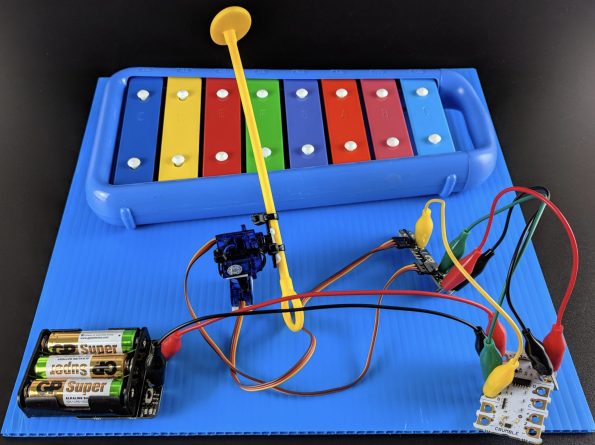
· Crumble-powered instruments – great for percussive sounds, but you can also use servo motors to ‘play’ glockenspiels etc.
These are the just some of the examples and creative ways you can use the Crumble across the curriculum. If you want more information or have some other great examples then don’t hesitate to get in touch.